
Help And Support
Payments, collections and transactions - Outward Telegraphic Transfer
-
What is OCBC World Transfer?
OCBC World Transfer is a secure outward telegraphic transfer (OTT) service for transferring funds globally in over 60 currencies, encompassing both major currencies such as USD or EUR, and commonly used currencies such as KRW and VND.
-
How long does a funds transfer take?
It takes between a few hours to 4 business days, depending on the location of your payee's bank account.
-
What is the exchange rate used for converting outgoing funds?
Our prevailing board / counter rate will be used to convert outgoing funds.
-
Can I transfer Malaysian Ringgit (MYR) to Malaysia?
Yes you can do so via our business internet banking service (OCBC Velocity) or submit a telegraphic transfer application form to any of our branches. -
Can I amend my Outward Telegraphic Transfer (OTT)?
You may submit a TT Amendment request digitally via OCBC Velocity if you realised that a mistake was made in the TT instruction after it has been submitted to the bank and authorised. Only TT with ‘Successful’ status can be amended.
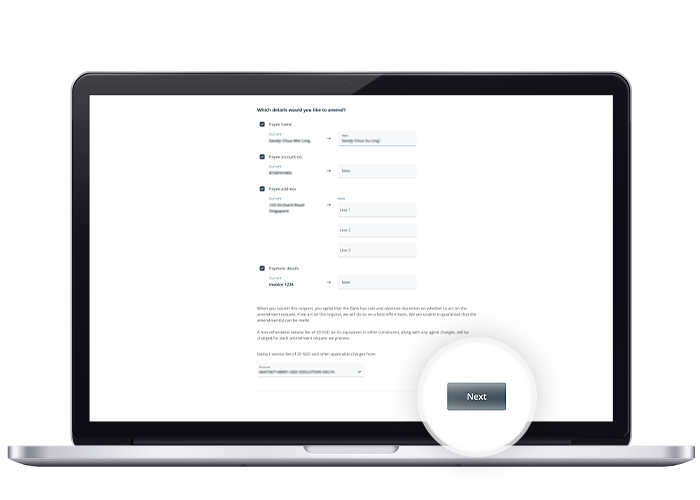
Transaction details that can be amended:- Payee name
- Payee account no.
- Payee address
- Payment details
You can no longer amend a TT when the transaction has been rejected or recalled successfully, and the fund is returned to you. Please submit a new transaction if required.
Amendment is on a best effort basis and a non-refundable fee of S$20 will apply. -
How do I amend my Outward Telegraphic Transfer (OTT) via OCBC Velocity?
Steps:
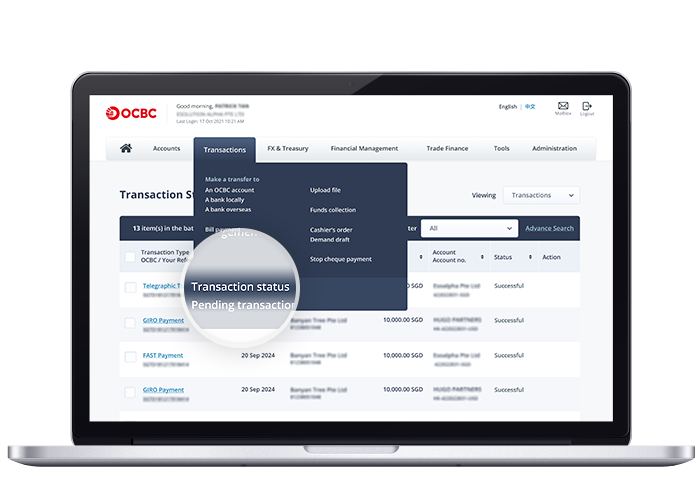
- Log in to OCBC Velocity and select the ‘Transactions’ tab at the top navigation bar. Under the drop-down, select ‘Transaction Status’.
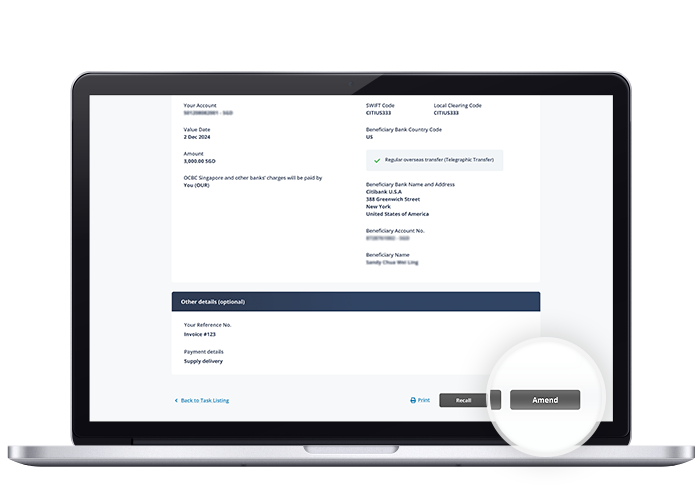
- Select your Telegraphic Transfer and click on ‘Amend’.
- Select the debit account no. to apply TT amendment fee, and click ‘Next’.
- Review and submit the amendment(s) for authorisation.
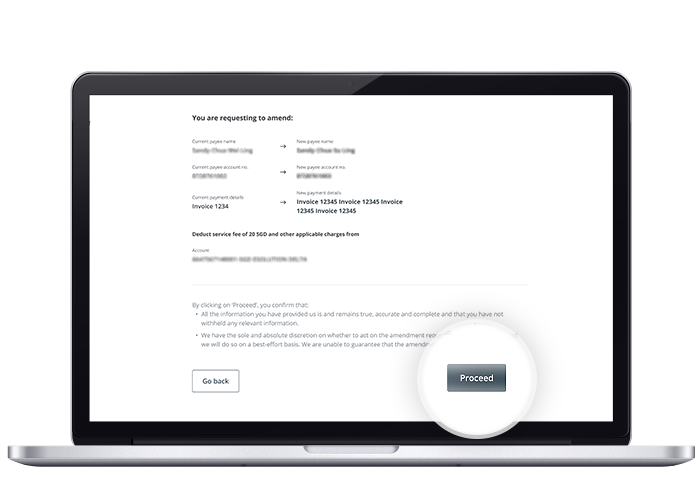
Note: The TT amendment request will be sent to the Bank for review if the same user can both create and authorise a transaction. - Once successful, the transaction page will show the relevant status.
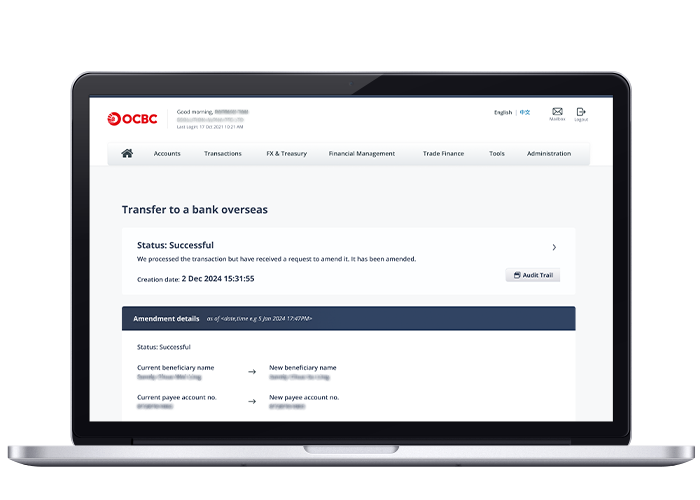
- Log in to OCBC Velocity and select the ‘Transactions’ tab at the top navigation bar. Under the drop-down, select ‘Transaction Status’.
-
Can I recall my Outward Telegraphic Transfer (OTT)?
You may submit a TT Recall request digitally via OCBC Velocity if you realised that a TT instruction is no longer required after once the transaction is submitted to the bank and authorised. Only TT with ‘Successful’ status can be recalled.
You can no longer recall a TT when the transaction has been rejected and the fund is returned to you.
Recall is on a best effort basis and a non-refundable fee of S$20 will apply. -
How do I recall my Telegraphic Transfer (TT) via OCBC Velocity?
Steps:
- Log in to OCBC Velocity and select the ‘Transactions’ tab at the top navigation bar. Under the drop-down, select ‘Transaction Status’.
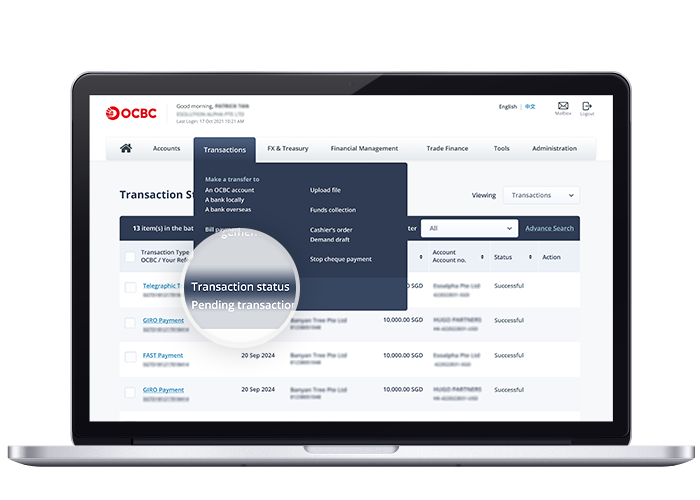
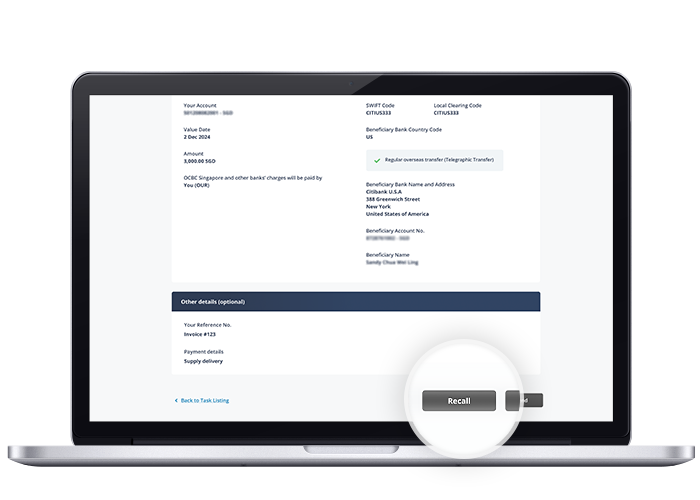
- Select your Telegraphic Transfer and click on ‘Recall’.
- Select the debit account no. to apply TT recall fee, and click ‘Next’.
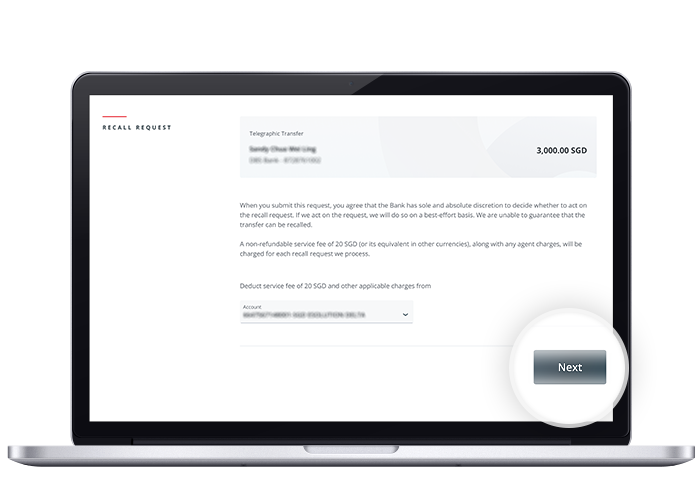
- Review and submit the TT recall request for authorisation.
Note: The TT recall request will be sent to the Bank for review if the same user can both create and authorise a transaction.
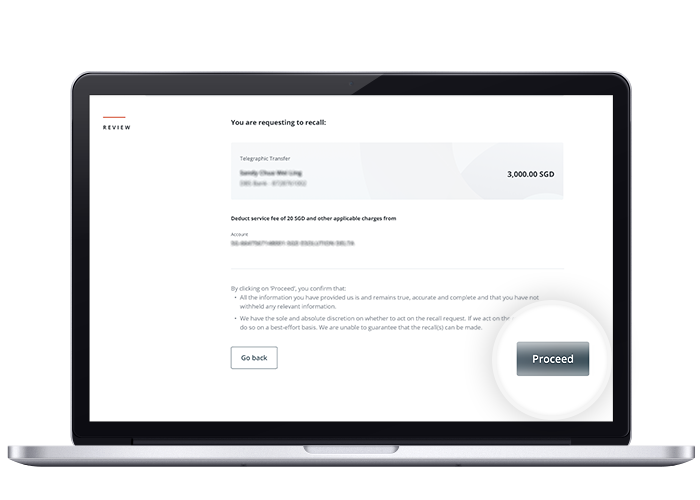
- Once successful, the transaction page will show the relevant status.
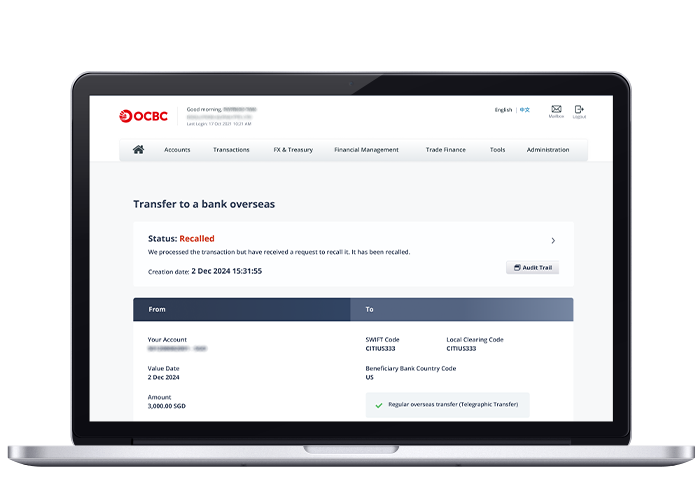
- Log in to OCBC Velocity and select the ‘Transactions’ tab at the top navigation bar. Under the drop-down, select ‘Transaction Status’.
-
How do I check overseas payments made to a beneficiary in the last 90 days?
To check on overseas payments that were made to a beneficiary in the last 90 days, you will need to download the MT103 through OCBC Velocity. This document serves as payment advice and proof of outgoing payment.
Log in to OCBC Velocity and go to the top menu, select Accounts > Overview > More > Remittance Inquiry. Search for the transaction by selecting the remittance type, then enter your transaction details.
Select Show MT103 Message to view the full details of your outgoing payment, then choose to 'Download' (for PDF) or 'Print' (for printable copy).
You may share the MT103 message with your beneficiary to check on the status of the payment.