

Elevate your wealth the premier way
Enjoy top-notch banking privileges with our suite of products.
Get expert insights
Stay updated with market insights and investment ideas from the OCBC Wealth Panel, our team of top wealth management experts from OCBC Group.

Navigate your financial journey with an elite team by your side
- Get supported at every stage of your financial journey
- Get tailored solutions and services that put your wealth needs first
- Gain access to a dedicated team of experienced wealth specialists and advisors

Get priority service
Join priority queues at selected OCBC Bank branches.

Grow your savings with rewards
Enjoy exclusive high-yield interest rates when you save with our Premier Dividend+ Savings Account.

Get the latest market insights at your fingertips
Stay up to date with the latest financial news and analysis from our experts.

Stay in control with a holistic view of your wealth
Get a full picture of how your portfolio’s assets are allocated with the OCBC Wealth Account.

Send money overseas – no fees charged!
Make overseas transfers in 19 currencies – no cable and commission fees will be charged.




Use your privileges at our Premier Banking Centres in Singapore and beyond

Be rewarded when you start a Premier Banking relationship with us
Earn up to 6,400 SGD* when you deposit 350,000 SGD in fresh funds. *T&Cs apply.
SGD deposits are insured up to S$100k by SDIC.
Already an OCBC Premier Banking customer?
Reach out to your Relationship Manager or call us
at 1800 773 6437 (local) / (65) 6530 5930 (overseas)
 Welcome rewards
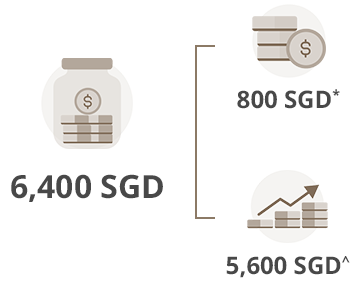
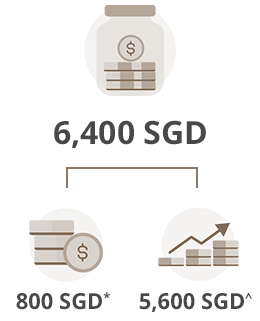
*Cash reward
Earn a cash reward of 800 SGD when you deposit 350,000 SGD in your Premier Dividend+ Savings Account.
^Interest earnings
Earn 1.60% interest a year when you deposit S$3,000 in your account a month – for 12 months – and make no withdrawals at all.
* Credited into OCBC Premier VOYAGE Card or OCBC Premier Visa Infinite Card.
^ Based on existing prevailing Premier Dividend+ Savings Account interest rate and account mechanism, which may be subject to change.
Terms and conditions apply
Online Call: Frequently Asked Questions
- What is Online Call?
Online Call, available 24/7 via the OCBC app, is a feature that allows you to call us from outside Singapore at no cost. You will not incur any roaming charges – just connect to the Internet using mobile data or Wi-Fi.
- How do I access Online Call?
Online Call is available via the OCBC app. You may access it using one of the following methods:
Method 1: Before logging in
- Open the OCBC app
- Tap ‘More’
- Tap ‘Online Call’
- Log in to the app
- Select the topic most relevant to your query and tap ‘Speak to us’
Method 2: After logging in
- Log in to the OCBC app
- Tap ‘More’ at the bottom navigation bar
- Tap the headset icon at top right or scroll to the bottom of the page and tap ‘Online Call (via Wi-Fi/data)’
- Select the topic most relevant to your query and tap ‘Speak to us’
Note: For the best experience, please make sure your device has been updated to the latest version of its operating system and is connected to a stable Wi-Fi or mobile data network.
- What type of enquiries can be handled through Online Call?
If you are overseas and need urgent assistance with matters related to your card, you may reach us via Online Call. For example, you might call to ask why a card payment at an overseas retail store could not be made.
- What should I do if my call gets disconnected or the call quality is poor?
Please check your Internet connection to ensure that you are connected to a stable Wi-Fi or mobile data network. Then, try calling us again.
- I do not see any way to access Online Call via the OCBC app on my device. Why?
To seamlessly integrate the Online Call feature into the OCBC app, we will be progressively making it available to users from November 2025.
In the meantime, please check that:
- You have downloaded the latest version of the OCBC app from App Store, Google Play Store or Huawei App Gallery; and
- Your device has been updated to the latest version of its operating system.
*The qualifying assets under management refer to deposits in the current or savings account(s) and time deposits, investments and insurance (with surrender value) products obtained through the bank.