




Help And Support
General - General
-
SingPost P.O. Box Cessation
Change to P.O. Box mailing addresses required
SingPost has informed us that they will cease their P.O. Box service on 31 March 2025.
If any of your mailing addresses in our records is a P.O. Box address, please change it to a non-P.O. Box one by 24 March 2025. This is to ensure that all items we send (e.g. letters, hardware tokens) continue to reach you in a timely manner.
1. How do I check if my account is linked to a P.O. Box mailing address
- Log in to OCBC Internet Banking > Customer service > Change mailing address.
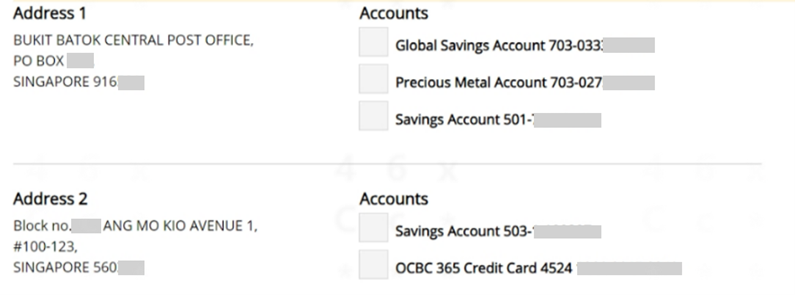
- On the ‘Change mailing address’ page, you will see all the mailing addresses in our records. Each address is linked to one or more accounts.
Here is an example:
PRIVY Box is a new mail management service by SingPost. For more information, please visit the SingPost website.
3. How can I change my mailing address in the Bank’s records?
Here is how you can change your mailing address in our records.
- Via OCBC Internet Banking
If your new mailing address is a PRIVY Box:
1. Log in to OCBC Internet Banking > Customer service > Change mailing address.
2. Select the account you wish to change the mailing address for, then click on ‘Next’.
3. Choose ‘PRIVY Box’ as the address type.
4. Enter ‘PRIVY’ in the ‘PRIVY Box’ field, then click on ‘Next’.
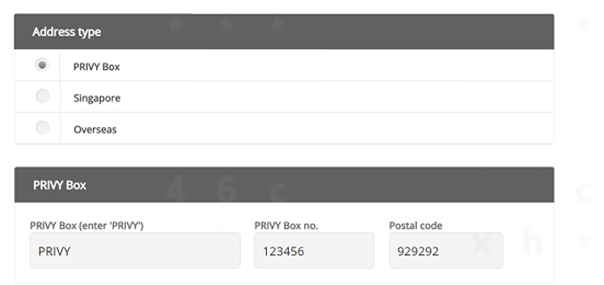
5. Click on ‘Submit’ to confirm your new mailing address.
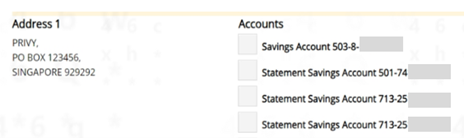
You may notice that your PRIVY Box no. is shown beside a ‘PO Box’ label (an example is shown below). Please be assured that we will still mail documents to your PRIVY Box.
If your new mailing address is not a PRIVY Box:
1. Log in to OCBC Internet Banking > Customer service > Change mailing address.
2. Select the account you wish to change the mailing address for, then click on ‘Next’.
3. Choose ‘Singapore’ or ‘Overseas’ as the address type, depending on the country that your new mailing address is located in. Learn more here
4. Click on ‘Submit’ to confirm your new mailing address. - Mail us a ‘Change of Address/Contact Details’ form
Complete the ‘Change of Address/Contact Details’ form and mail it to:
OVERSEA-CHINESE BANKING CORPORATION LIMITED
ACCOUNT SERVICES
PRIVY BOX NO. 920340
SINGAPORE 929292
If your new mailing address is a PRIVY Box, please fill in your PRIVY Box no., postal code and country under ‘New mailing address’.
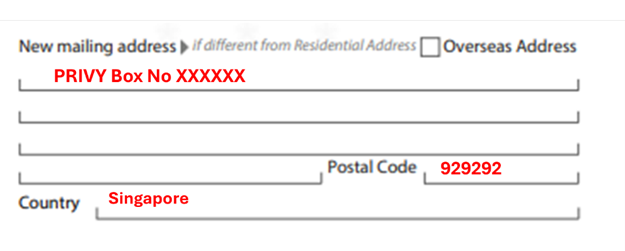
If your new mailing address is not a PRIVY Box, fill in your new mailing address, postal code and country under ‘New mailing address’.
We will notify you once we have processed your request. - Visit any OCBC branch
You may request to change your mailing address at any branch near you. We will notify you once we have processed your request.
A change to mailing address is a key account change. As such, for your security, we are only able to accept such requests if they are made via OCBC Internet Banking, using the ‘Change of Address/Contact Details’ form or at an OCBC branch. You will not be able to change your mailing address over the phone.
We seek your understanding on this matter.
5. How do I know if my mailing address in your records has been updated?
We will notify you – via email or push notification, or by sending you a paper or an electronic letter – once we have processed your request.
Paper letters, if sent, will be mailed to both your old (P.O. Box) and new mailing address.
-
CRS
What is CRS?
The Common Reporting Standard (CRS) is a new information-gathering and reporting requirement for financial institutions. The main objective of CRS is to help tax authorities identify tax payers that have kept their untaxed money in accounts held by foreign financial institutions and therefore discourage such behaviour. CRS is a reporting regime and it does not impose a new taxation regime.
For more information on how this affects you, please see our FAQ guide.
-
Enhanced security measures
Providing you with a safe banking experience has always been our utmost priority. Visit www.ocbc.com/onlinesecurity for details. -
Change personal contact details via OCBC app or OCBC Internet Banking
OCBC Internet Banking
What details can you change?
- Mailing Address
- Email and phone number (including SMS OTPs)
What accounts can the changes be applied to?
- Current, savings and credit cards
- Other Accounts:
- Loans
- Unit trust
- CPF-SRS
- Foreign Exchange
- Nominees
- Bills
- Treasury products
- Safe deposit box
- iOCBC
- OAC/Great Eastern
How long will it take for the changes to be effective?
Update of mailing address on current and savings accounts and OCBC credit cards will take effect immediately. For other accounts and products, it will take 7 working days.
For update of email and phone number (including SMS OTPs), it will take at least 12 hours for the changes to be effective.
Here are the steps:
- Login to OCBC Internet Banking
- Click "Customer Service" in the top navigation bar
- Select "Change mailing address" or "Change personal details"
- Provide details you would like to change in the relevant fields
- Click "Next" to proceed
- Check that your details are correct
- Click "Submit" and authorise the transaction using your hardware token or *OCBC OneToken to complete the transaction
Note:
To update the address for a credit card that has been suspended, please key in the card number under "Other account(s) not listed above" in the “Account No.” field. The address will be updated within 7 working days.
OCBC app
What details can you change?
Change of email and phone number (including SMS OTP)How long will it take for the changes to be effective?
It will take at least 12 hours for the changes to be effective.Here are the steps:
- Log in to OCBC app
- Tap on the "More" icon in the bottom navigation bar
- Tap on "Profile & app settings"
- Select "Update phone number/email"
- Enter details you would like changed in the relevant fields (fields left blank will not be changed)
- Tap on "Save" to proceed
- Check that your details are correct
- Click "Confirm" and authorise the transaction using your hardware token or *OCBC OneToken to complete the transaction
Do not have OCBC Internet Banking/ OCBC app?
Apply with your ATM Card number and PIN.* If you have activated OCBC OneToken, you will not be required to enter OTPs for OCBC app as authentications will take place seamlessly in the background. For OCBC Internet Banking, you will need to click "Accept" on One Token push notification sent to your mobile device to authenticate your transaction. Please visit ocbc.com/onetoken for more information.
-
Change personal contact details via mail
What details can you change?
- Residential address
- Email and phone number (including SMS OTP)
- Mailing address
What accounts can the changes be applied to?
- All accounts
How long will it take for the changes to be effective?
- Changes will take effect within 7 working days of our receiving the form.
Download and complete the form.
-
Change personal contact details or update personal details via ATM or Service Kiosk
1. Change personal contact details
At an OCBC ATM/ATM Plus (ATM locations)
What details can you change?- Mailing address
- Email address
- Contact number
What accounts can the changes be applied to?
- Savings, current, credit card and foreign currency call accounts
How long will it take for the changes to be effective?
The changes will take effect immediately. Here are the steps:- Select “More Services” twice
- Tap the right arrow to go to the second page
- Select “Update contact particulars”
At an OCBC NEW ATM / Service Kiosk:
What details can you change?
- Email address
- Contact number
What accounts can the changes be applied to?
- Savings, current, credit card and foreign currency call accounts
How long will it take for the changes to be effective?
The changes will take effect immediately. Here are the steps:- Select “More Services”
- Select “Personal Details”
- Select “Update contact particulars”
2. Change of personal details
At OCBC Service Kiosk:
What details can you change?Personal details (during banking hours only as this requires assistance from a Digital Ambassador)
Types of Changes Documents required Name - Singaporean or Permanent Residents: New NRIC or 11B or original deed poll dated not more than a year
- Malaysian: New IC or Passport
- Foreigners: New Passport (or old passport if either nationality or date of birth does not match)
NRIC, Passport Number - Singaporean: NRIC
- Malaysian: New IC
- Foreigner: New passport (or old passport if either nationality or date of birth does not match)
Nationality - Certificate of citizenship/Singapore blue NRIC/ICA NRIC collection slip (for new citizens who have not collected their new NRIC)
FIN - Original Singapore Government issued pass; and
- Original passport
-
Change personal details at branches
What details can you change?
- Residential/mailing address
- Email and phone number
- Employment details
- Passport details
- Citizenship
What accounts can the changes be applied to?
- All accounts
How long will it take for the changes to be effective?
- Residential/mailing address or email and phone number: 3 working days. Please complete and bring the form, along with your NRIC or passport to any OCBC Bank branch.
- Employment, passport and citizenship details: 7 working days. Please visit any OCBC Bank branch with your supporting documents so we may assist you.
-
Retrieve access code
Your access code will be given to you when you sign up for Internet Banking. It is needed, together with your PIN, to login.
How to retrieve your access code if you are not sure?
You can retrieve your access code via ocbc.com/resetHere are the steps:
OCBC app:
- Log in to OCBC app.
- Tap on "Trouble Logging In?".
- Tap on "Get Help".
- Fill in the online form with the following details:
- Identification Type (NRIC/Malaysia IC/Passport)
- Identification number
- Date of birth
- Tap on “Verify” and you will be redirected to a browser that shows the following self-help services:
- Retrieve OCBC Internet Banking Access Code
- Reset OCBC Internet Banking PIN or Access Code
- Request for New Hardware Token
- Sign up for OCBC Internet Banking
- Tap on “Get Help” and fill in the online form with the following details:
- Last 8-digits of card.no
- 6-digit Pin
- Identification Type (NRIC/Malaysia IC/Passport)
- Identification number
- Date of birth
- Tap on "Agree" after reading the Terms and Conditions.
- Enter your ATM/credit/debit card PIN and your new 6-digit OCBC Internet Banking PIN. Enter again to confirm then tap "Submit".
- You will be prompted to enter the one-time password (OTP)* which is sent to your registered mobile number/or using OneToken authentication.
- Upon successful verification, you will be able to log in with your new OCBC Internet Banking PIN/unlock your OCBC Internet Banking access.
OCBC Internet Banking:
- Go to ocbc.com/reset
- Fill in the online form with the following details:
- Last 8 digits of your active OCBC ATM/debit/credit card
- Your 6-digit card PIN
- Your personal details
- Extra Security Check
And click "Next". - Under the dropdown menu, select "Retrieve Internet Banking Access Code", and click "Next".
- Click on "Accept" after reading the Terms and Conditions.
- Enter your new 6-digit Internet Banking PIN, confirm on New PIN and click "Submit".
- You will be prompted to enter the one-time password (OTP)* which is sent to your registered mobile number.
- Upon successful verification, you will be able to retrieve your Internet Banking Access Code.
Alternatively, you can contact us at 1800 363 3333 or +65 6363 3333.
*If you have activated OCBC OneToken, you will need to click "Accept" on One Token push notification sent to your mobile device to authenticate your transaction. Please visit ocbc.com/onetoken for more information.
Your access code will be given to you when you sign up for Internet Banking. It is needed, together with your PIN, to login. If you're not sure what your access code is, contact us at 1800 363 3333 or +65 6363 3333. -
Rates
-
Fee Waiver
Please do not submit fee waiver requests via our feedback form or secured email as we will be unable to take instructions from these channels.
Credit Card Fee Waiver
To submit a credit card fee waiver request, please use any of the following options:
Via OCBC Internet Banking
- Log in to OCBC Internet Banking
- Go to “Request credit card fee waiver”
- Select "Credit card fee waiver"
Via OCBC app
- Log in to OCBC app
- Tap on the "More" icon in the bottom navigation bar
- Tap on "Card services" > "Request fee waiver"
Via Phone Banking
- Have your credit card ready
- Call us and when prompted, and say "credit card fee waiver"
- Key in your 16-digit card number when prompted
Your waiver request is subject to approval. You will be notified on the outcome immediately.
EasiCredit Fee Waiver
To submit an EasiCredit waiver request, please follow below instructions in our Phone Banking system:
Press <1> for English
Press <1> for phone banking menu
Press <0>
Press <2> for EasiCredit
Press <1> for EasiCredit fee waiver
Key in your NRIC number, followed by the "#" key
Press <1> to confirm NRIC
Customer will be prompted to key in mobile number
Press <1> to confirm mobile numberYour waiver request is subject to approval. You will be notified of the outcome via SMS in 5 business days.
-
Cards, EasiCredit and ATM withdrawal activation
Please send the SMS request from the mobile number you registered with us. Send the request to 72323 (local) or +65 9327 2323 (overseas)
-
Credit and Debit Card activation
ACT<space>NRIC/Passport<space>Last 4 digits of card number
Example: ACT S7637838X 1234 -
Overseas ATM withdrawal activation
ATM<space> NRIC/Passport<space>Last 4 digits of card number<space>start date in DDMMYY <space>end date in DDMMYY <space>activate
Example: ATM S7637838X 1234 011216 311216 activate -
EasiCredit and ATM card activation
AEC<space>NRIC/Passport<space>Last 4 digits of card number
Example: AEC S7637838X 1234
-
Credit and Debit Card activation
-
OCBC Bank and Branch code
Bank code: 7339
The first three numbers of your OCBC account number are branch codes. Your OCBC Account Number should either be 10 or 12 digits.
Example of OCBC Bank account numbers:
555-1-234567 where 555 is the branch code
501-123956-001 where 501 is the branch code -
Customer Satisfaction Survey
At OCBC Bank, we are dedicated to listening to valued customers like you and understanding your needs.
You may receive a call or SMS to ask for feedback on our service quality. Any information provided will be kept strictly confidential.
If we send you an SMS, it will be through sender ID 72323 or 70988.
Our appointed telephone survey vendor is Ascentiq Pte Ltd. Our vendor will never ask for your personal account information, such as account balances and passwords, over the phone. If you do get such a request, do not disclose any information and call us at 1800 363 3333 immediately.
If you need further clarification about the survey or do not wish to participate, please call us at the above number.
Thank you for banking with us. We look forward to hearing from you about how we can improve and serve you better.
-
General information about MyInfo
1. What is MyInfo?
MyInfo is a consent-based data platform that pulls your personal data across participating Government agencies to fill out e-forms.
2. How does MyInfo work?
-
Retrieve MyInfo & Provide Consent:
Your personal data can be pre-filled on the online application form for the OCBC 360/FRANK/Monthly Savings/Bonus+ Savings/Statement Savings Account by simply clicking on the "Use MyInfo" icon. Your consent will be sought before any data is transferred from MyInfo. -
Online application form for 360/FRANK/Monthly Savings/Bonus+ Savings/Statement Savings Account is pre-filled:
The online form will now be populated with your personal data from MyInfo for you to verify before you take any other steps to complete the account application.
3. Why can’t I log-in to MyInfo?
Please ensure that you have keyed in the correct SingPass ID and password. If you are still unable to log-in, your MyInfo profile may have been inactivated due to security and data privacy concerns. Please contact MyInfo Helpdesk for more assistance.
MyInfo Helpdesk hotline number is +65 6335 3534.
Operating hours are from 8.00 am to 8.00 pm (Mondays to Fridays) and from 8.00 am to 2.00 pm (Saturdays). Closed on Sundays and Public Holidays.
4. Why are some of the fields retrieved from MyInfo non-editable?
Some of your personal data fields have been validated by the relevant government agencies. As any changes would have to be re-validated by the relevant source agencies, such fields have been made non-editable.
5. My Government-verified information populated on the OCBC 360/FRANK/Monthly Savings/Bonus+ Savings/Statement Savings Account Account application form is incorrect. What should I do?
Government-verified fields are validated by various relevant source public sector agencies. Please contact the relevant public sector agency to update your Government-verified fields if they are incorrect.
Refer to https://www.singpass.gov.sg/myinfo/intro on the relevant agencies for each of the fields.
6. What are the benefits of using MyInfo?
With the use of MyInfo in the online applications, you can enjoy the following benefits:
- Open your account instantly and faster form filling for 360/FRANK/Monthly Savings/Bonus+ Savings/Statement Savings Account application
- No supporting documents such as NRIC copy are required
7. Where do I register for MyInfo?
With effect from end 2017, all SingPass users will receive a MyInfo profile. You no longer need to create a profile before using MyInfo to apply for a bank account.
-
-
Applying for account using MyInfo
What are the benefits of using MyInfo in the online account application?
Convenience – With the use of MyInfo, the online account application form will be populated with only the required personal data. You are only required to verify the information and complete the account application.
No supporting documents – you are only required to provide an image of your signature to complete the account application. There’s no need to submit other documents, such as NRIC copy and other identity proofs anymore.
Instant – receive your account number immediately upon successful completion and approval of your account application.
I want to use MyInfo for the CASA account application, what do I need to do?
- Select an account and click on the “Apply online” button.
- Select “Use MyInfo”
- Login using your SingPass credentials and OTP from SingPass
- Provide consent for OCBC to pre-fill your application
- Complete the rest of the additional fields on the form
- Submit your signature image (Image should not exceed 2MB for .jpg or .png format or 50KB for .pdf format).
- On the acknowledgement screen, you will see your account number when your account is opened successfully.
What happens after my account is opened?
We will send you a letter with details of your account in 3 working days.
If you are a new customer with OCBC or do not already have OCBC Online Banking, you will receive your OCBC Online Banking access code and PIN within 8 working days.
If you have applied for a debit card, you will receive the debit card and PIN within 9 working days.
Why are some of the fields retrieved from MyInfo non-editable?
Some of your personal data fields have been validated by the relevant government agencies. As any changes would have to be re-validated by the relevant source agencies, such fields have been made non-editable.
I have used MyInfo, but I do not get an account number upon completion
Your account will be opened instantly when all checks are completed successfully. If you have submitted your application, we will update you within 3 working days on the status of your application.
-
General information about OCBC remote online account opening
What is openaccount.ocbc.com?
Openaccount.ocbc.com is an online remote current account and savings account opening capability. Customers can apply for an account online, without visiting any OCBC branch.
Who can use the openaccount.ocbc.com?
All Singaporeans and Permanent Residents can use the remote online account opening capability. Please ensure that you meet the minimum age criteria for the product application (e.g. the minimum age for the 360 Account is 18 years old).
- How do I use the online remote account opening capability?
To open an account online, select the account you wish to apply for and click on the "Apply online" button application.This is accessible via a desktop web browser or a mobile browser.
To enable a simpler, faster and instant account opening, we have integrated MyInfo to pull your personal data from the MyInfo database to fill out the online application upon your consent.
What products can I apply online?
Currently, we only offer the OCBC 360/FRANK/Monthly Savings/Bonus+ Savings/Statement Savings Account for remote online account opening. We are working to make more products available for online application.
If I have an existing relationship with OCBC, can I still use the remote online account opening capability?
The remote online account opening capability is open to all customers, even if you have an existing relationship with the bank. This is currently available to Singaporeans and Permanent Residents only.
What is the difference between account opening on Internet Banking and the remote online account opening via openaccount.ocbc.com?
Account opening on both OCBC Internet Banking and openaccount.ocbc.com are similar.
Account opening on Internet Banking is only applicable to existing OCBC bank customers with internet banking access and a valid referencing OCBC bank account.
Account opening on openaccount.ocbc.com lets existing and new customers apply for an account online (for Singaporeans and Permanent Residents).